Posts

Prusalink customapi example for homepage

I've switched to prusalink/prusaconnect recently from octoprint and missed the nice homepage integration so have knocked the following up, you just need to update your IP and api key and you should be sorted. Thought it may be of use to others. Initially there is no api key generated on a prusalink install and it will be blank, you just need to click reset and it'll create this one. This won't affect the printers connection to prusaconnect if your using that also. I am using pi zero's but do not have them powered from the printer board so i can power the printers off when not in use. When you do this however the status that then gets returned is ERROR. I've remapped that to show powered off which works in my case but you can always remove that part. I've used the additional field option so that the target and actual temp of the nozzle and bed are shown on a single line rather than taking up 4 lines. As it's a list you can just append more onto the end. I...

Epever RS485 to wifi adaptor v1.5 released!!

Image
Well it's been quite some time has passed but I've finally got around to finishing this up and have now released the devices on Tindie and my own personal store. I have setup a discord server to discuss the board and if people have any feature requests or other feedback they are more than welcome.   Discord Link This is the latest release and represents a shift from the passthrough method to a new style of the ESP8266 extracting the data which is viewable locally but then is also possible to post this to an MQTT broker or influxdb database.   For flashing i would recommend using the application esphome-flasher which is a great tool for writing the firmware and it has a version for most OS's.  It can be downloaded from  Link The firmware is available from  Link I have created a 3D printable case which is on thingiverse.  It's a snug fit but once it's in there it won't shift and the RJ45 socket ends up nice and flush with the case. You can download it at...

Assembling the Power bank Keep-alive based on 555 Timer

Image
First off thank you for your purchase!    I made this device for working with small devices to keep powerbanks/power supplies alive as they can frequently auto shutoff if they believe the device is not on as it is drawing so little power.  Once assembled the device shall look as per below (resistor colours may vary and also the case colour may vary if you've ordered one) The 3D case design is on Thingiverse Once inside the case the assembled unit shall look as per below So enough of the end product, lets look at what the kit shall look like I have where possible labelled the parts in the packaging but the current shipping parts are coloured as above which makes identification easier.   Assembly notes The resistors have no polarity so can be placed in either direction. The capacitors have a polarity which can be identified in two ways.  The longest leg is the positive side and also the negative side has a white strip down that side.  On the PC...

Setting up your RS485 to Wifi Adaptor

Image
How to get started with your RS485 to Wifi adaptor You shall need to use a standard RJ45 network cable, make sure it's not a crossover. Once it's connected you shall need to connect and configure your WiFi so the adaptor can connect to your network.  I am using my phone and on searching for networks you shall see a new network beginning with ESP : - On connecting to the network you shall have to open a browser and manually enter the ip address http:/192.168.4.1 note on most devices you won't need to enter the http:// Once connected you shall see the connection screen which details the IP address of the connected network. We have no connected network so the address is 0.0.0.0 To configure your network you shall need to select your network and then input your WiFi password.  The device shall then connect to your network and when you go to the main page you should see the IP address your device has been given. Your device ...

I'm back and starting to pull my powerwall back again.

I've been experiencing some issues as i foolishly shut it all down completely over the winter but there must have been some parasitic draw from a device and it get extremely low and i have resurrected it however one cell is low and has been getting to around 2v during the night so the powerwall is going to be pulled down and rebuilt i think, going for a different design this time. I previously used Paul Kennets design which was a 24p packs which were then put in parallel with 3 other packs to create a 96p pack however this has a lot of interconnects so i think going for big 80p packs as many others have done shall be the best way forward.  To do this however i will need to strip all the cells out and retest everything and leave them for a few weeks to test for self discharge and then use repackr to assemble. That is a lot of work!!!

Getting custom BMS data into Grafana

Image

Epever/Epsolar output to InfluxDB/Grafana

Image
I setup reporting for my EPever solar charge controller a while ago using  using the following guide at  sporadic projects .  It works but have been hankering for something a little more/different and saw a posting recently of someone using grafana and influxdb to report on their PIP based solar setup so i set about recreating this and in all honesty it wasn't as bad as i thought and after a few days i've gotten something up and running. The first step was setting up my pi, i decided to reuse a aging pi1 which caused some issues as i couldn't install things from the standard repo's so it needed a little more tinkering.  I documented this as i went so i hope this helps others using it on a pi1 also. The below shall download a precompiled influxdb setup and install it.  It will then add a custom repo to your sources list and install grafana and then start it up and enable it at startup.  Lastly it shall install php and the curl library for php and the...
Image
I've two solar charge controllers from EPsolar or EPever as they are sometimes known. They are great and have a COM port for monitoring the performance of the panels and state of the battery etc but it's a pain to drag the laptop out and hook things up just to check the status. The COM port is a RJ45 port which uses the RS485 standard so i investigated commercial offerings but they were extremely expensive and as this was just to make things convenient for a personal home product i didn't fancy paying £50 out for the I began to investigate doing this myself and using some off the shelf components and custom firmware from the guys at esp-link i was able to come up with the design you can see in the picture. I've made both a instructable available here and also a set of YouTube videos on the procedure. http://www.instructables.com/id/Wireless-Solar-Charge-Controller-Monitor-RS485-to-/ http://www.youtube.com/c/ColinHickey1
Image
Hi guys, I've kindly been sent a new gadget to have a look at by a company called 1byone in the form of a LED bluetooth controller bulb that also has a bluetooth speaker built in.  I plan to integrate this with the blinkybox toy i made for my kids so that they shall be able to control the room lighting as well as the colour of the box itself. You can get the product here  Link  and I've put up a short video of it in action link .  I'm going to do a full review of it soon as well as a video when it's integrated with blinky box :-) I did have to purchase an adapter separately for it to work in a standard baynet B22 socket (UK style) but it was only 72p link They also have a promotion on a couple of other items which would be great for a party, a smoke machine  Link  as well as a sound activated stage light which again would be excellent for a kids Halloween party  Link .  Lastly they have a deal on iphone 6 cases link
Image
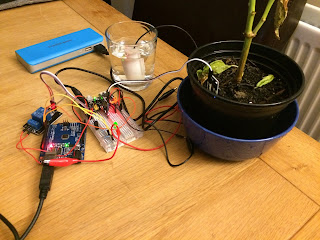
Been doing some more electronics tinkering and put up an instructable of a self watering plant pot using a small 6v motor and an arduino to control it via a relay. I've put together a short YouTube video with it as well, i really need to work on my camera skills, more specifically the lighting as i think that's really affecting it. The instructable is here Let me know what you think and any suggestions would be really appreciated even if it's criticism.

Blinkybox

Image
Been bitten by the electronics bug lately and built a small lightup toy for my little ones which i've documented at  Instructables  for those who fancy having a go at it themselves.  I've been amassing components so plan many more builds.

Building your own Steam Box

Never thought i'd see the day but i have actually gotten to the point where i prefer to use a controller than the keyboard and mouse, i can only say that i must be getting old! I've went with a Dell Optiplex 790 paired up with a  KFA2 GeForce GTX 750Ti OC "Low Profile"  which i have to say I've been mightily impressed with, as it didn't come with a low profile bracket i had to purchase one.  I threw in a SSD which i had lying about and it's been fantastic, it was only 128GB so I've just purchased a 512GB SSD but i'm mightily impressed with it. I use a cheap xbox 360 wireless adaptor which i purchased from Amazon  Link  that works great, it's a pain to find the 64 bit drivers but once that is sorted it's just a case of firing up steam in big picture mode and your all sorted.

Plex Client on Raspberry Pi

I've got myself a Raspberry pi so i'm attempting to compile plex media center for it.  I'm doing this blog entry for personal reference more than anything but shall come back and keep things updated with what I've done so far and how successful i am. git clone git@github.com:gewalker/plex-linux.git cd plex-linux git submodule init git submodule update sudo apt-get install automake build-essential autoconf autopoint libtool libboost1.46-all-dev libx11-dev libgl1-mesa-dev libxrender-dev portaudio19-dev libavcodec-dev libavformat-dev libswscale-dev libavdevice-dev libglew1.6-dev libmad0-dev libsamplerate-dev libogg-dev libvorbis-dev libbz2-1.0 libbz2-dev libwavpack-dev libmpeg2-4-dev libfribidi-dev libsqlite3-dev libpng-dev libpcre3-dev libcdio-dev libmysqlclient-dev libmodplug-dev libfaad-dev libflac-dev libsmbclient-dev libsdl-mixer1.2-dev libxt-dev libxtst-dev libxmu-dev libxinerama-dev libcurl4-gnutls-dev libdbus-1-dev libhal-storage-dev libhal-dev libpulse-dev...

Compiling ABGX360 on a Seagate Dockstar

This is a really useful app and wanted to install it on my dockstar, after some digging i found out it can be compiled successfully and it works great.  I've created a script which installs the required pre-requisites and then compiles the program and creates a hidden folder under /root called .abgx360 and moves the file there.  The script can be downloaded and run by running the following cd /tmp wget " http://shne02559.pwp. blueyonder.co.uk/deb-abgx.sh " chmod +x deb-abgx.sh ./deb-abgx.sh The packages i found i required were libcurl4-openssl-dev  zlib1g-dev build-essential libwxgtk2.8-dev If anyone knows different I'd love to hear from you as i like to keep the number of packages i have installed on the box to a minimum.  I plan on creating a post download script for sabnzbd to invoke abgx360 if i get time as it would be handy to have a report created in the directory automatically.  I'll post this as soon as i get around to it.

Installing episode butler and sabnzbd on the Seagate Dockstar.

As i've mentioned i've gotten myself a nice Dockstar with the intention of running sabnzbd as well as episode butler.  I currently have a WHS running which works well but i've always been concerned about power usage even if it is an Atom board so have decided to go the ultra low power route which i don't mind running constantly. I've had to rebuild the dockstar a few times so thought i'd create a script to make life much easier.  I'm assuming that you've followed the excellent guide from Jeff at link i've used this a few times now and it's worked excellently.  The only thing which caught me out was forgetting to set the boot partition as active. Anyway down to the interesting stuff, if you run the following commands on your newly setup debian dockstar you will end up with a vanila install of sabnzbd as well as episode butler. cd /tmp wget " http://shne02559.pwp. blueyonder.co.uk/epinstall.sh " chmod +x epinstall.sh ./epinsta...

Dockstar

Just got myself a lovely dockstar courtesy of a friend in the states for a mere £22 which is bargain to say the least. I've installed it once already and had it working pretty nicely but knocked the power lead twice in a row causing the newly setup debian install to refuse to boot any longer :( Still at least there are some positives, i've decided to document the install to get it up and running with sabnzbd and episode butler which are the two main things i plan to run and sure a lot of people are planning the same also.

WHS update

Well it's been somewhile since my last post but found that managing a full time job and being a new Dad is quite a task and take up the majority of my time these days !! Getting a bit more free time though so i've splashed out on a PC-Q08 case for a much needed upgrade and plan to do it this weekend so shall post some pics and a write up of how i find the case.  Watch this space :)

DVBLink Dreambox v2

Playing catchup at the moment with the latest releases as i'm now a Dad !!  Little baby adam was born on the 13th Feb at 4:12 and mum and baby are doing well. I plan to upgrade to V2 of DVBlink Dreambox and also install the network pack at the same time, i'm moving these to my WHS so all the machines in the house can access the tuners so fingers crossed it all goes ok !

HP MediaSmart EX490

If your in the UK HP are doing a special deal at the moment with £90 off the purchase price and a further %10 off with a code they have published on the advert.  If your quick they are doing a free Marks and Spencer hamper also! You can checkout the deal here

MCE Standby Tool

Just wanted to give a small mention to MCE Standby tool which i've been using on my living room media center setup for a while now and found it incredibly useful for making sure it stays in standby mode and only comes out when it needs to.  You can get the tool from here :)